
Let’s be honest: “We’ll get to holiday SEO in November” is the kind of plan that sounds reasonable until November arrives. Suddenly, the gift guides need writing, the offers need updating, and everyone wants to know why the site isn’t ranking yet.
Search engines need time to discover and evaluate your pages, and your team needs time to do the work well. I’d rather make those decisions with a little breathing room than in a Black Friday panic. Here’s how to plan ahead, choose useful priorities, and make the most of the time you actually have.
Key Takeaways
- Start holiday SEO planning months ahead of Black Friday, because search engines need time to find and rank your pages and your team needs time to do the work well.
- Use last season’s performance data to set priorities, and improve existing pages that already earn visibility before creating new content.
- Keep holiday URLs live year-round and refresh them each season so they hold on to the authority they’ve built.
- Make sure your site is fast, indexable, and ready for traffic spikes, and keep local details like holiday hours current so shoppers can easily buy or visit.
- Coordinate SEO with paid, email, and social around a few priorities your team can finish, and measure success by conversions and sales, not just rankings.
Table of Contents
How holiday search behavior changes during Q4
Q4 search behavior looks different from the rest of the year. Shoppers begin researching weeks before they buy, so informational queries spike earlier while transactional searches peak closer to Black Friday and Cyber Monday. Competition for visibility also intensifies as more businesses publish seasonal content and bid on the same keywords.
Holiday SEO planning starts with recognizing when your customers’ questions change. Watch for these patterns, then check which ones actually show up in your own search and sales data:
- Earlier research phases: Shoppers browse gift ideas and compare products well before purchasing
- Gift-focused queries: Searches like “gifts for dad” or “best headphones for teens” increase significantly
- Deal-seeking behavior: Terms containing “Black Friday,” “Cyber Monday,” and “deals” spike sharply
- Mobile dominance: More searches happen on phones during commutes and downtime
When to start your holiday SEO plan
The short answer: earlier than you think. SEO takes time because Google crawls, indexes, and evaluates pages before deciding where to rank them. In 2026, Black Friday falls on November 27 and Cyber Monday on November 30, so count back from those dates.
Early planning also gives you room to be selective. When every idea sounds urgent, it’s easy to build a content calendar that would require three more people and a minor holiday miracle. Agree on the work that matters most before the wish list becomes everyone’s problem.
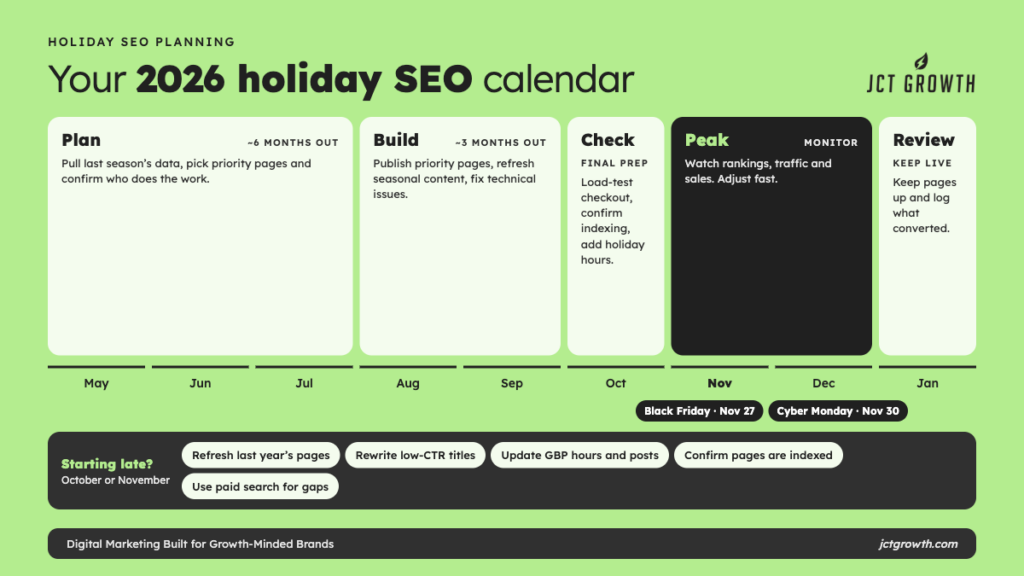
Six months before peak season
For a late-November peak, late May gives you a useful planning window. Pull last year’s performance data, identify which holiday pages contributed to sales, and map out opportunities. Decide who will do the work and what they can realistically deliver before expanding the plan.
Three months before peak season
For a late-November peak, use late August to put the plan into action. Publish priority landing pages, refresh useful seasonal content, fix technical issues, and add relevant internal links. Aim to have the main work live ahead of the rush so there’s time to check it and make adjustments.
During peak season and after
Monitor rankings, traffic, and conversions in real time. After the season ends, resist the urge to delete holiday pages. URLs that have accumulated authority over time will perform better next year than brand-new pages.
If you’re starting late
If it’s already October or November, put your time into pages that already have authority rather than launching new URLs. Refresh last year’s holiday pages with current dates, prices, and stock. Rewrite the meta titles and descriptions on pages that get impressions but few clicks. Update your Google Business Profile with holiday hours and posts. Confirm that every holiday page is indexable and listed in your sitemap. Then use paid search to cover the terms you can’t rank for this season, and note which ones convert so they go into next year’s plan.
If you’re reading this in October, take a breath. There’s still useful work to do. Prioritize pages with relevant visibility, products you can reliably fulfill, and fixes your team can finish before the rush. Paid search may help with selected gaps if the budget and likely return support it.
How to use last season's performance data
Your best source of holiday keyword and content ideas is your own historical data. Google Analytics and Google Search Console (a free tool that shows how your site performs in Google search) reveal which pages drove traffic, which keywords converted, and where users dropped off.
This is where I’m very happy to spend some time with a spreadsheet. Start with:
- Top-performing holiday landing pages by traffic and conversions
- Keywords that drove impressions but had low click-through rates
- Pages with high bounce rates or short session duration
- Device and location breakdowns for holiday traffic
Low click-through rates on high-impression keywords often signal a meta title or description problem. High bounce rates might mean the page didn’t match what searchers expected. Gaps like this become your optimization priorities. Check average position first, though. A keyword ranking on page two will have a low click-through rate however good the title is.
I know a fresh content calendar feels productive. But before adding another page, check what your existing pages could do better. A relevant page already earning impressions may offer a more practical opportunity than a new article that needs to build visibility from scratch.
How to build a holiday keyword strategy
Start your keyword research with what customers searched for last season and which landing pages led to sales. That gives you a more useful starting point than a long list of holiday terms.
1. Pull historical search and sales data
Google Trends shows how search interest for specific terms changes over time, which helps you spot when holiday queries start rising. Combine Google Trends data with Search Console data and your own sales records to identify patterns worth targeting.
2. Identify seasonal and long-tail holiday keywords
“Best gifts for new dads under $50” gives you something to work with: a recipient, a budget, and a shopper who would appreciate a little help. Compare specific searches like this with your inventory and performance data before deciding which deserve a guide. A popular search isn’t much use if you can’t deliver what it promises.
3. Cluster keywords by search intent and funnel stage
Think about the person behind the search. Someone asking “what to buy for a minimalist” is still looking for direction. Someone comparing “best minimalist wallets” has narrowed the options, while “buy minimalist wallet” suggests they’re closer to a purchase. Build content that helps with the decision they’re making at that moment.
4. Map keywords to pages and content formats
Assign each keyword cluster to a specific page. A gift guide might target informational and commercial queries while a product category page targets transactional ones. Avoid keyword cannibalization, which happens when multiple pages compete for the same term and dilute each other’s rankings.
How to plan holiday landing pages and content refreshes
Start by deciding which existing pages can serve shoppers well with an update and where a new page would fill a real gap. Your team doesn’t need to create something new for every keyword variation.
Evergreen holiday hub pages
Give shoppers one reliable place to find your seasonal offers and related guides. A reusable URL such as “/holiday-deals” lets you refresh that resource each year and retain the links it has earned.
Black Friday and Cyber Monday landing pages
Create dedicated Black Friday and Cyber Monday pages when you have distinct offers and enough demand to justify them. If those pages already exist, update their content and dates while keeping useful URLs consistent. Start with what shoppers need rather than creating pages just because the calendar says November.
The calendar changing is not, by itself, a good reason to give a useful page a new address. If the page still serves the same purpose, improve it and build on the links and visibility it has already earned. Save the fresh start for your January gym membership.
Gift guides and buying guides
Gift guides capture long-tail traffic from people searching for specific recipients or price ranges. Organize gift guides by category (“gifts for remote workers”), price (“gifts under $25”), or interest (“gifts for coffee lovers”).
Refreshing last season’s pages
Check last season’s pages before assigning new content. Update dates, prices, and availability, then ask what would make the page more useful: clearer comparisons, better product selection, or answers to questions shoppers keep asking. Changing the year in the title is only the beginning.
Technical SEO and site speed prep for peak traffic
Technical prep rarely gets the exciting part of the holiday planning meeting. I get it. “Let’s discuss caching” has limited festive appeal. But if shoppers can’t browse, select products, or check out reliably, the creative work has a much harder job.
Core Web Vitals and page speed
Core Web Vitals measure loading speed, responsiveness (measured by Interaction to Next Paint), and visual stability. Google uses Core Web Vitals as ranking signals, and users simply leave slow pages. Tools like PageSpeed Insights show where your site can improve.
Crawlability and indexation
Google can only rank pages it knows about. Submit an updated sitemap, check for crawl errors in Search Console, and make sure your holiday pages aren’t accidentally blocked by robots.txt or noindex tags.
Structured data for products and offers
Structured data (also called schema markup) helps search engines understand your content. Product schema can display price, availability, and ratings directly in search results, which can improve click-through rates. Star ratings also require review markup on the page.
Server load and caching
Traffic spikes can slow or crash sites. Caching stores copies of your pages so servers don’t rebuild them for every visitor. Content delivery networks (CDNs) distribute that load across multiple servers. Talk to your hosting provider or developer about capacity before the rush.
Plan load testing with your developer before peak demand. Prioritize the steps shoppers need to complete a purchase, especially product selection, cart updates, and checkout. A polished gift guide won’t help much if the cart stops working.
Local SEO tactics for seasonal shoppers
Holiday shoppers have very practical questions: Are you open? Is it available nearby? Can I collect it before the holiday? (Some of us are asking with considerably less time to spare than others.) For a local business, making those answers easy to find is part of helping someone buy.
Google Business Profile updates
Google Business Profile (GBP) is the free listing that appears in Google Maps and local search results. Update GBP with holiday-specific information, including seasonal products, gift card availability, or special services.
Seasonal hours and holiday posts
Add your holiday hours to GBP so customers know when you’re open. Use Business Profile posts to promote seasonal offers, events, or limited-time products. Posts appear directly in your business listing.
Multi-location page optimization
If you have multiple locations, check the details for each one: hours, available services, pickup options, and relevant offers. Local pages should help someone plan a visit, rather than repeat the same seasonal paragraph with a different city name.
AI search optimization for holiday queries
AI-powered search tools like Google’s AI Overviews, ChatGPT, and Perplexity are changing how people find information. Optimizing for AI systems is becoming an important consideration alongside traditional SEO.
Optimizing for AI Overviews and LLM answers
AI systems pull from well-structured, authoritative content. Clear formatting, direct answers to questions, and topical depth increase the likelihood of being cited in AI-generated responses.
Structuring content so AI can cite it
Use clear headings, concise answer paragraphs, and organized lists. AI systems extract and reference content that’s easy to parse. A well-structured FAQ section, for example, often gets pulled into AI-generated answers.
Tracking visibility across ChatGPT, Perplexity, and Google AI
Start with a small, consistent set of questions your customers might ask an AI search tool. Record whether your brand appears, which pages are cited, and when you checked. Repeat the same questions over time, while recognizing that answers can vary between users and sessions.
Treat those checks as directional evidence, then compare them with referral traffic and conversions where you can identify them. An appearance in an AI answer is useful to track, but it doesn’t tell you whether someone visited your site or bought anything.
Coordinating SEO with paid, email, and social campaigns
This is where I’d resist the urge to do all the things. Look at how your existing channels can support the same holiday priorities, and give shoppers a consistent offer and a clear next step wherever they find you. Your team needs a coordinated plan it can maintain through the rush.
| Channel | How it supports holiday SEO |
|---|---|
| Paid search | Tests keywords before committing organic resources; fills gaps while SEO rankings build |
| Email marketing | Drives traffic to holiday landing pages; brings back repeat visitors |
| Social media | Amplifies content reach; makes shared content more likely to earn links |
Review paid search results alongside organic opportunities. A term that brings in profitable sales can help you decide where deeper content or landing-page work deserves investment.
A converting paid keyword is a useful clue, not an automatic assignment for the content team. Look at search intent, competition, margins, and the work required. I’d rather see a team follow through on a few strong opportunities than spend December trying to finish twenty half-built ones.
How to track holiday SEO performance
Decide what success looks like before the campaign goes live. Otherwise, it’s very easy to end up with a lovely dashboard and a surprisingly difficult answer to “Did this help the business?” Track visibility, but connect it to the actions you actually need.
Traffic and ranking KPIs
Track organic sessions, keyword rankings for target terms, impressions, and click-through rate. Traffic and ranking metrics show whether your visibility is improving.
Conversion and revenue metrics
Traffic alone doesn’t pay the bills. Set up key events in Google Analytics 4 to measure form fills, purchases, phone calls, or whatever actions matter to your business.
Real-time dashboards and reporting
During the holiday rush, you want visibility into performance without digging through reports. Tools like Google Analytics and Looker Studio let you build dashboards that update automatically.
Common holiday SEO mistakes to avoid
These are easy mistakes to make when the calendar is full and everything has somehow become urgent:
- Starting too late: A short runway limits your options; focus on useful updates to established pages and achievable fixes
- Deleting holiday pages after the season: You lose accumulated authority and have to rebuild next year
- Ignoring mobile experience: A large share of holiday searches happen on phones
- Neglecting site speed: Slow load times during traffic spikes hurt conversions and rankings
- Keyword stuffing: Cramming holiday terms into content hurts readability and can trigger penalties
- Forgetting local optimization: Outdated hours and location details make it harder for nearby shoppers to plan a visit
Focus Your Holiday SEO Plan on What You Can Execute Well
A holiday SEO plan can turn into a wish list pretty quickly. Before committing to ten new gift guides, look at the pages already attracting shoppers, the products you can reliably fulfill, and the time your team has to improve them. I love a good content idea. I love it even more when there’s a realistic plan to finish it. Choose priorities you can execute well and measure against sales.
If you need help deciding where to focus, reach out to JCT Growth and let’s build a plan your team can put to work.
Frequently asked questions about holiday SEO planning
Most holiday SEO efforts take three to six months of lead time before results appear, since Google requires time to crawl, index, and rank new or updated content.
B2B and SaaS companies can benefit from holiday SEO if their buyers research or make purchasing decisions during Q4, especially for annual budget cycles or end-of-year planning.
Yes. Keep holiday landing pages live year-round and update them annually, since deleting pages means losing the search authority those URLs have built.
Holiday SEO focuses on seasonal keywords, compressed timelines, and higher competition, while year-round SEO builds steady visibility over time without the same urgency.
AI-generated content can rank if it's accurate, helpful, and well-edited, but content that lacks originality or human review often underperforms compared to thoughtfully crafted pages.